At a recent meetup of cybersecurity professionals, I was engaged in a discussion on where to start when launching a data security program from the ground up. A recent grad interested in this space asked a bunch of questions. Sometimes the most basic tend to be the most fundamentally important ones… “What are sensitivity labels?” Someone a lot more experienced replied “think of them as a tag on a file so you know what’s in it”. Though partially correct, it doesn’t paint the full picture. In other words, the ‘so what’ of it. For a Microsoft365-centric enterprise, sensitivity labels are not just “tags.” They play an important role in connecting business classification decisions typically memorialized in a data classification schema (e.g.: Public, Internal, Confidential, Secret, etc.) to protection, monitoring, and governance across Microsoft365. Sensitivity labels help to classify and protect organizational data while preserving productivity and collaboration. Microsoft Purview Sensitivity Labels are the foundational capability (gateway drug?) that provides protection actions and interacts with other Purview solutions as part of a robust enterprise Data Security Program (for reference, click here for Microsoft’s Data Security solutions).
This post is part of a series on Microsoft Purview Sensitivity Labels. This is blog post 1, in which my focus is on what Sensitivity labels are, where they can be applied, and how they’re different from similar capabilities offered by other non-Microsoft vendors.
At a program level, sensitivity labels connect classification taxonomy to Purview administration, Microsoft365 workloads, and downstream controls such as DLP, IRM, eDiscovery, activity monitoring, and Copilot protections, as shown below.
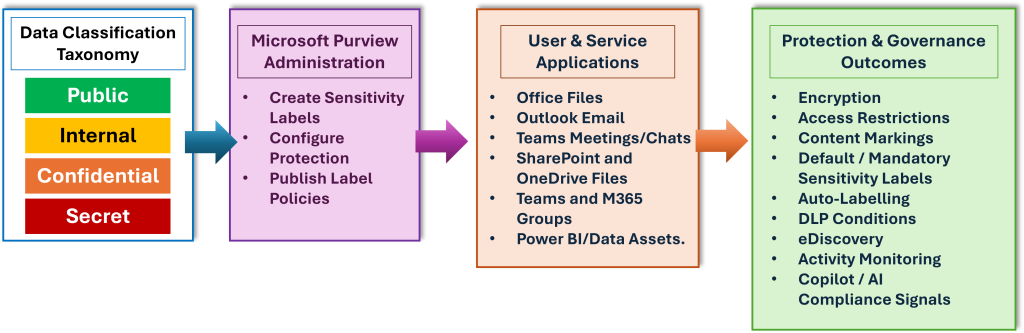
Deploying Sensitivity Labels across your enterprise connects business classification decisions to Microsoft Purview administration, user-facing Microsoft365 experiences, and downstream protection and monitoring controls. If your organization is just getting started with its Data Security Program, then deploying sensitivity labels is the crucial foundational step in the right direction.
This blog post is intended to provide a more comprehensive answer to the original question and expand on where sensitivity labels can be applied. I will also spotlight some technical and business considerations for enterprise organizations looking at launching or maturing their Data Security programs.
But first… What even is a “sensitivity label”?
Let’s expand on the original, partially correct definition. A Microsoft Purview sensitivity label is a configurable “tag” that serves as a classification to be applied to supported content or containers to indicate sensitivity. Aside from helping users more easily identify the sensitivity classification of the content they are working with, a sensitivity label can also be configured to enforce protection settings, thereby ensuring users are interacting with content aligned to your acceptable use and data handling protocols. This “tag” gets applied to content; it is customizable, stored in clear text metadata for files and emails, and is persistent (meaning the label remains with the content as it moves across locations, devices, apps, and services).
Security leaders should think of a sensitivity label as both a business “tag” and a technical control. As a business “tag”, it tells users and systems how sensitive the data is. As a technical control, it can apply encryption, restrict usage rights, add headers, footers, or watermarks, and support reporting and activity analysis. Importantly, a sensitivity label is different from Outlook’s built-in ‘sensitivity’ setting, which expresses sender intent but does not provide data security controls. Sensitivity labels are also different from retention labels, which are related to managing your Information of Business Value within the Records Management domain. For organizations with a relatively low data protection and data security maturity, it is not uncommon to hear these two types of “labels” create confusion, particularly when someone refers to either one simply as “labels”. In Microsoft365, each supported item can have a single sensitivity label from the organization, while documents and emails can also have a retention label applied separately. It’s to keep this distinction clear and separate that I will continue to refer to them as “sensitivity labels” throughout this post.
Where can a sensitivity label be applied?
Sensitivity labels can be applied across a broad set of Microsoft365 experiences, but the exact behavior depends on workload, licensing, configuration, and client support.
| Where a Sensitivity label can be applied | What to be mindful of |
|---|---|
| Office files and emails | Labels appear in supported Microsoft365 Apps such as Word, Excel, PowerPoint, and Outlook after they are published to users. Office built-in labeling requires a subscription edition of Office; Outlook labeling requires mailboxes hosted in Exchange Online. |
| SharePoint, OneDrive, and Teams files | When enabled, SharePoint and OneDrive can process supported Office files and PDFs with sensitivity labels, including files encrypted by a label using supported configurations. Users can apply labels in Office for the web, SharePoint/OneDrive details pane, and the Teams Files tab. |
| Teams, Microsoft365 Groups, SharePoint sites, Viva Engage communities, Loop workspaces | Sensitivity labels in this context are often referred to as “Container” labels, which can control privacy, external user access, external sharing, unmanaged device access, authentication contexts, shared channel controls, etc. NOTE: items inside these containers do not automatically inherit the container label or item-level settings such as encryption and content markings. |
| Meetings and chat | Labels can extend to Outlook and Teams meeting invites, meeting settings, and Teams chat. They can enforce options such as who can bypass the lobby, who can present, recording/transcription controls, watermarking, encryption for meeting video/audio, and copy restrictions for meeting chat or transcripts. Some options require Teams Premium, automatic and recommended labeling for meetings is not supported, and S/MIME or Double Key Encryption labels cannot be used for calendar items, Teams meetings, and chat. |
| Power BI, Fabric, Data Map, and third-party scenarios | Microsoft documents label extension to Power BI, Fabric, Microsoft Purview Data Map assets, Defender for Cloud Apps, and the Microsoft Information Protection SDK for third-party app integration. |
The practical consideration for technology leaders looking to deploy sensitivity labels at your enterprise organization is that while sensitivity label coverage is broad, it is not uniform. Every rollout should validate workload support, licensing, client versions, file types, encryption choices, guest access patterns, and business workflows before broad enforcement..
How are Purview Sensitivity Labels different from similar technology that other non-Microsoft vendors may offer?
Comparable non-Microsoft platforms may offer classification, DLP, rights management, CASB/SaaS protection, or encryption. The key distinction in a Microsoft365-centric enterprise (and in my humble opinion a true advantage in the Microsoft ecosystem) is its architecture-productivity cohesiveness. Purview sensitivity labels are built directly into Microsoft365 apps and services, published to users through label policies, stored as persistent metadata, and understood by multiple Microsoft365 workloads and Purview controls, while avoiding all the usual integration and automation complexities that makes the journey to sensitivity labelling at enterprise orgs more turbulent than is necessary.
This creates three practical differentiators that makes it easier to deploy and adopt sensitivity labels, and easier to administer them using the same toolset that your Security and Compliance teams are working in today:
- Native user experience. Labels are available to users where they already work (Office apps like Word/Excel/PowerPoint, Outlook, SharePoint, OneDrive, Teams, and related services) rather than requiring a separate classification workflow.
- Native Admin experience all within Microsoft Purview. The same sensitivity label can become a signal for DLP, eDiscovery, activity monitoring, Copilot protections, and compliance reporting as part of a more comprehensive Data Security Program. Sensitivity labels can be configured as usable conditions in Purview DLP policies across Exchange, SharePoint, OneDrive, devices, Microsoft365 Copilot, Fabric, Power BI, and other locations.
- Extensibility without abandoning Microsoft365. Microsoft supports label-aware protection for third-party apps and services through Defender for Cloud Apps and the Microsoft Information Protection SDK, which means organizations can extend labeling without treating Microsoft365 as a disconnected island.
Does this mean Purview replaces every specialized Data Security tool out there? Not exactly. What it does frequently imply for most Microsoft365-centric organizations that are under increasing cost pressures (but where reliable industry-leading Data Security tools are still a requirement) is that Purview sensitivity labels should be evaluated as the default classification and protection layer. This should be strongly considered before introducing overlapping or extending controls. The debate often focuses on whether non-Microsoft tools offer more niche or powerful ways to extend these controls. Even so, there is clear value in keeping signals consistently integrated within a platform your administrators already understand, helping the organization achieve security goals while avoiding the complexity and friction created by a patchwork approach.
Hopefully this provides you with some actionable insights as you firm up your plans to roll out Microsoft Purview sensitivity labels at your enterprise org. In my next blog post in this series on sensitivity labels, I’ll cover why they are a foundational component to an enterprise organization’s first Data Security Program, and additional considerations that may help you in your forward journey.
Thanks for reading, and please reach out if you’d like to discuss the practical next steps you can take… or if you have a question and just want to chat more!

1 thought on “What Are Sensitivity Labels?”
Comments are closed.